RayNeo’s Air 3s and its upgraded version, the Air 3s Pro, are wearable video display glasses (“XR / AR video glasses”) aimed at people who want immersive viewing (movies, gaming, portable screens) rather than full augmented reality overlay stuff. The base 3s is already quite good: vivid micro-OLED, good virtual screen size, multiple modes, eye-comfort tech; the Pro version builds on this with brighter display, upgraded optics / fit / comfort, and stronger visual features. If you want the best viewing experience, especially in brighter light or with stricter comfort requirements, the Pro is the better choice.
Let’s make long story short: If you’re mostly watching in dim / indoor settings and want a more affordable immersive video experience, the Air 3s gives strong value. But if you want crisper visuals, better brightness, sharper edges, and more comfort (especially for long sessions or mixed lighting), the Air 3s Pro is the clear winner.
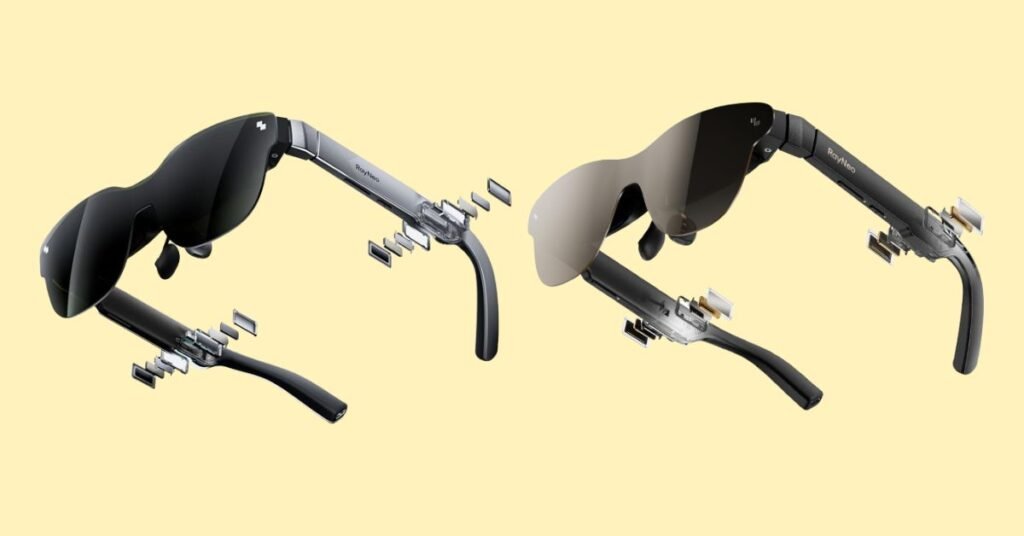
Why Do I Recommend the RayNeo Air 3s Pro?
- Higher Brightness — The Pro boasts ~1,200 nits to-eye brightness vs the ~HueView standard brightness on the base 3s. This means better visibility in ambient light and less washout.
- Improved Display Tech (HueView 2.0, etc.) — The Pro builds on the original display with upgraded version, giving more vivid contrast, color accuracy, and likely better optics / less artifact at edges.
- Better Fit & Comfort Features — Pro has more options and refinements: better nose pads, lighter build (76g), more balanced weight distribution, adjustable temples etc. These matter especially in long viewing sessions.
- Same Strong Core Features + Extras — Both share many core strengths: 120 Hz refresh rate, vibrant color (98% DCI-P3 or similar), large virtual screen (~201″), eye comfort modes (flicker-free/dimming), modes for Game/Movie/Standard. The Pro just adds improvements on top.
Detailed Comparison & Recommendation
| Feature / Spec | RayNeo Air 3s | RayNeo Air 3s Pro | Which Is Best & Why? |
|---|---|---|---|
| Brightness | (Base) HueView screen with ~ standard brightness (not specified very high nits); good indoors. | ~1,200 nits to-eye brightness, significantly brighter. Better in ambient light. | Pro — much better in mixed lighting; less eye strain or need to crank up brightness. |
| Display / Visual Fidelity | 120 Hz refresh rate, good color (98% DCI-P3), contrast, accurate color, hybrid dimming, multiple modes. | Same refresh & color base, plus HueView 2.0 display, improved optics and sharper rendering near edges. | Pro if you care about image sharpness or work/consume content in higher ambient light. |
| Eye Comfort & Modes | Flicker-free / low blue light, adjustable brightness levels, multiple viewing modes. | Adds more refined eye comfort, ensures flicker-free at high PWM/hybrid dimming, etc. | Pro gives improved comfort in long sessions. |
| Audio & Privacy / Leakage | Built-in speakers, “Whisper Mode 2.0” for private audio, ambient light / audio leakage controlled well. | Quad-speaker system, spatial audio algorithms that follow head movement; likely better audio immersion. | Pro wins if you care about immersive sound and spatial audio. |
| Weight, Fit, Build | Strong build, adjustable nose pad / temples; decent comfort. | Lightweight (~76g), better weight distribution, more adjustments; Pro more refined in ergonomics. | Pro better for long use / comfort. |
| Screen Modes / Environment Handling | Modes for Game / Movie / Standard; color accurate; comfort tech. | Same modes + enhancements; better handling of ambient light with higher brightness, sharper visuals. | Pro more versatile across usage environments. |
| Check Best Seller | Check RayNeo Air 3s Best Price | Check RayNeo Air 3s Pro Best Price | If budget allows, Pro gives more than just incremental upgrade. |
What Are The Major Differences
- Brightness: Pro ~1,200 nits vs base ~ standard (lower).
- Display / Optics: Pro uses HueView 2.0, likely sharper edges, improved image fidelity.
- Comfort / Fit: Pro lighter with improved weight distribution, refined adjustment features.
- Audio / Immersion: Pro adds quad-speaker spatial audio and refined private audio features.
- Ambient Light / Versatility: Pro handled better in brighter environments; base 3s gets washed out more easily.
- Price premium: Pro costs more; whether the upgrade is “worth it” depends on how much you’ll use in challenging lighting and how picky you are about edge sharpness / comfort.
Check RayNeo Air 3s Pro Limited Time Deal Here
What Users Are Saying
| Feature / Feedback | Air 3s Users | Air 3s Pro Users |
|---|---|---|
| Visual / Screen Clarity | “Colors are vivid; watching movies is immersive; edges a bit soft sometimes.” | “Edges much sharper; brighter image; less washed out under ambient room lighting.” |
| Comfort & Wear for Long Time | “Comfortable; nose pads help; after a while light fatigue.” | “Pro feels more balanced; lighter; can wear for longer without discomfort.” |
| Ambient Light / Use Outdoors | “Good indoors; daylight or bright windows reduce contrast.” | “Pro maintains better contrast in brighter light; more usable in mixed lighting.” |
| Recommended Best Seller | Check RayNeo Air 3s Best Price | Check RayNeo Air 3s Pro Best Price |
Fair Advice to Consider
- If you will mostly watch in dark / indoor conditions, base 3s may be enough and you may not notice all the Pro’s benefits.
- If you often have ambient light (windows, daylight), or use the device outdoors / in travel / switch between settings, the Pro’s brightness and improved optics make a big difference.
- Also consider how often you wear for longer sessions: comfort, weight distribution, and fatigue become more important. The Pro helps here.
- Budget vs upgrade: if the Pro is significantly more expensive, decide if the visual / comfort improvements are worth the extra cost to you.
Quick Comparison Table – RayNeo Air 3s vs Air 3s Pro
| Spec / Feature | RayNeo Air 3s | RayNeo Air 3s Pro |
|---|---|---|
| Brightness | Standard HueView brightness (~650 nits perceived) | ~1,200 nits to-eye brightness |
| Display Tech | HueView OLED, 120 Hz, ~98% DCI-P3 | HueView 2.0 OLED, 120 Hz, sharper edge-to-edge clarity |
| Virtual Screen Size | ~201″ equivalent | ~201″ equivalent (brighter and sharper rendering) |
| Audio | Built-in speakers, Whisper Mode 2.0 | Quad-speaker system with enhanced spatial audio |
| Comfort & Weight | Solid fit, adjustable nose pads, ~80g weight | Lighter at ~76g, better balance, more refined adjustments |
| Eye Comfort | Flicker-free, low blue light modes | Improved hybrid dimming, better long-session comfort |
| Use Case | Best indoors in darker rooms | Best for mixed/bright environments and long use |
| Price | Check RayNeo Air 3s Best Price | Check RayNeo Air 3s Pro Best Price |
FAQs
What’s the biggest difference between RayNeo Air 3s and Air 3s Pro?
The Air 3s Pro has much higher brightness (~1,200 nits to-eye), sharper optics (HueView 2.0), lighter build, and improved comfort.
Do both glasses have the same refresh rate?
Yes. Both the Air 3s and Pro support 120 Hz refresh rate, which is smooth enough for movies, gaming, and fast-motion content.
Are the colors the same between the two models?
Both support 98% DCI-P3 color and excellent contrast, but the Pro version has better edge-to-edge clarity and calibration, making visuals more accurate.
How much more comfortable is the Air 3s Pro?
The Pro is lighter (~76g) and has better-balanced weight distribution, adjustable temples, and refined nose pads, making it more comfortable for long sessions.
Is the Air 3s Pro worth the higher price?
If you’ll use it often in mixed lighting or long viewing sessions, yes — the Pro’s brightness, comfort, and clarity improvements are worth it. If you’ll only use it indoors occasionally, the Air 3s offers better value.
Do both models support gaming and console use?
Yes. Both are compatible with Steam Deck, Switch, Android, and other consoles, offering immersive virtual screen experiences.
Final Verdict
For most users looking for immersive video / gaming / theater-like viewing experiences, RayNeo Air 3s Pro is the better choice. It enhances brightness, visual clarity, comfort, and audio in ways that are meaningful—not just incremental. If I were buying one today and could afford it, I’d go with the Pro, especially since the display improvements and comfort upgrades are tangible in day-to-day use. But if you’re budget-constrained or use mostly in dim, controlled lighting, the standard Air 3s still delivers strong performance and great value.
Jump To